
|
IMM Connection Selection, Deselection
The Command Packet Protocol
(CPP)
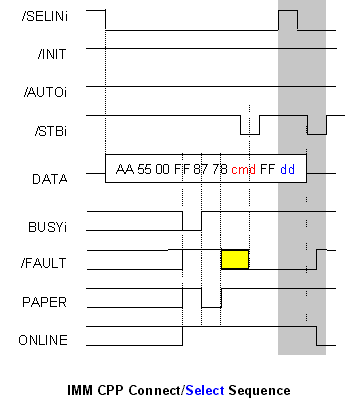 |
The ccp sends an identifying stream (0xAA5500FF8778) on the interface with NO handshake (7us minumum between bytes).. The zip will recognise this sequence go BUSY. nFAULT is set low if the zip is in a selected state (good), hi otherwise (bad) The interface then sends the command byte with standard /STROBE pulse. This is 'ok' because the zip will have isolated the interface from the printer by this time. During the shaded select sequence, /Fault is set HI in response and status is presented on ONLINE and PAPER (want command) |
*
* Values for cmd are:
* 0000 00aa Assign address aa to current device
* 0010 00aa Select device aa in EPP Winbond mode
* 0010 10aa Select device aa in EPP mode
* 0011 xxxx Deselect all devices
* 0110 00aa Test device aa
* 1101 00aa Select device aa in ECP mode
* 1110 00aa Select device aa in Compatible mode
*/
for connection. the entire connect sequence is repeated 3 times The command byte as follows
0xE0 Select device 0 in
compatible mode
0x30 Disconnect all devices
0x28 EPP MODE OR
0xE0 (Re)select
compatible mode
For selection,
after the 3 byte connect sequence has been sent, the device id (dd) is issued. This is the scsi devnum dd = 0x80 | (1<<devnum)
for disconnection only cmd = 0x30 is sent.
For Detection.
For sensing a zip drive, the selection seuqnce is not sent. The state of /FAULT determines if the zip has responded to the probe (active lo).