
. . Overview
Rel2Ace is a program that generates data converters from relational to object-oriented format semi-automatically, i.e. with some help by the user. By providing information that cannot be derived automatically, the user assists the program in relating the relational schema to the object-oriented schema of the target database (normally ACEDB). The derived information is then used to create a optimized converter for the data conversion at hand.
For the interactive part of the schema conversion a GUI (Graphical User Interface) has been created that facilitates the verification and change of the derived information.
This document doesn't provide a tutorial on how to use Rel2Ace, but tries to shed some light on the design decisions and on the structure of the internally used files. This supports the creation of additional tools using or changing the information in these files.
Warning: in this document we assume that the reader is familiar (to a certain extent and depending on the chapter read) with relational and object-oriented databases, with the programming language Perl, and the IGD Project.
Acknowledgements
We are very grateful to the IGD group in Heidelberg for their constant help. Express thanks go to Detlef Wolf for providing valuable informations about the inner workings of GDB and ACEDB as well as utilities used as a basis for the described tool. Furthermore we express our thanks to Professor Rothermel and the department of Distributed Systems for their advice and encouragement.
One of the authors has been funded by the DKFZ (The German Cancer Research Centre) as part of the IGD development [IGD] under the CEU contract GENE-CT93-0003.
Rel2Ace is a converter that has been developed specifically for the IGD-Project [IGD], but in principle is this program able to convert arbitrary relational data models and formats into object-oriented models and data. The only restriction is that the source data has to have a specific format.
Rel2Ace consists of two parts, the schema converter for the interactive conversion of the relational schema of the source database to the target database's object-oriented schema, and the data converter generated automatically. The schema converter displays relational and object-oriented schema graphically as well as the automatically derived relations.
Rel2Ace assumes a kernel-neighbour schema in the relational data model, meaning that there exist relatively few tables representing the nucleus of the represented objects, and neighbour tables, that are attached to these nuclei like electrons, thus representing a normal atom. Neighbour tables can be shared by kernel tables (as it is in the normal life of nuclei), providing information necessary for more than one object.
All in all, we can have 3 types of tables in the relational schema we assume:
Tables are direct neighbours if a direct relation exists between them. Indirect neighbours are tables that are connected via one or more other table's relations.
A, B and C are neighbours. A and C are indirect neighbours, the other tables direct neighbours.
Determining the neighbours can lead to errors sometimes. To find and correct this cannot be done automatically, because the number of possibly correct solutions is too high. Normally this results from too many neighbour relations found by the program either through wrong system dictionaries in the relational source database, or because the search range for relations has been set to large (three methods exist too determine relations in Ace2Ace, no relations, primary key relations, direct attribute name matching).
But there are some strategies to help the user identify the wrong neighbour relations and correct the problem.
Advantage: Easy to understand and to implement.
Disadvantage: Most of these relations have most certainly been correct. As a side-effect
all indirect neighbours connected by this table are no longer related. This
can lead to more manual work by the user.
Advantage: Not all relations of the table in question have to be deleted, thus
diminishing the amount of work left for the user to create the correct
neighbour relations.
Disadvantage: There can still be some incorrect relations left, which have to be
removed in a second step.
Advantage: The minimal set of relations has to be deleted, thus preserving the
maximum information possible.
Disadvantage: The probability for correctness of this strategy is very low. The side
effects of this strategy are not easily understood by the user.
An acceptable solution is the presentation of the neighbour relations to the user. The common case will be only one or two wrong relations. But each wrong relation, in an avalanche-like reaction, leads to a lot of other tables being included into the neighbour relationship. This can on the other hand be used to determine the wrong relations by identifying the relations leading to a group of wrong tables. These are the ones to cut.
The Object Class Key is a construct found e.g. in GDB [GDB]. It is used for the space efficient representation of data dependant relations. It provides a dynamic type for the foreign key and thus can be used to "collapse" different tables into one. The advantage is that only one table instead of multiple tables is needed. The clear disadvantage is that consistency checking depends wholly on the user application. The database itself is reduced to a store of tables.
Rel2Ace is able to operate on Object Class Keys to enable the conversion of databases using this feature.
Normally relations between tables would be modelled like this:
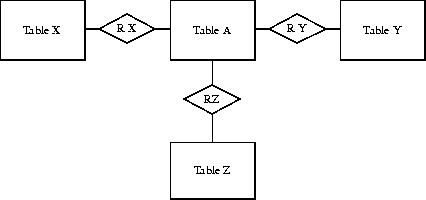
X(x_id, ...) R X(x_id, a_id)
Y(x_id, ...) R Y(y_id, a_id) A(a_id, ...)
Z(x_id, ...) R Z(z_id, a_id)
If a Object Class Key construct is used, only one table holding relations is created, and the contents is interpreted according to an entry in a special column dedicated to the identification of the target table:
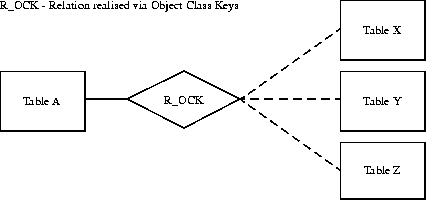
X(x_id, ...)
Y(x_id, ...) R_OCK(Class_key, Obj_id, a_id) A(a_id, ...)
Z(x_id, ...)
The entry R.Class_key contains a table code that identifies the target table for the relation, and R.Obj_id is then used in this table to find the related entry.
Choosing Tcl/Tk [Tcl/Tk] as the implementation language for the schema converter has the following advantages:
The disadvantages, e.g. that it is slow compared to compiled languages, don't matter in an interactive application, where the programs waits for the user's inputs 90% of the time.
Two languages have been discussed as candidates for the resulting data converter, C and Perl. The following requirements have to be met:
We decided to use Perl, because the implementation of the text operations is quite efficient, has built in garbage collection (resulting in simpler code), because it has not to be explicitly compiled, and compiles the program internally.
In pseudo code notation the algorithm looks as follows:
for all Kernel tables
{
  find object definitions via links from kernel tables to OO model
  for each row in kernel table
  {
    for all link from object definitions to other tables
    {
      find rows attached via relations
    }
    generate a new object instance from the found values
  }
}
Rel2Ace is started by entering
wish -f rel2ace.tcl
on the command line.
Alternatively, you can make a short script with this command in it, change it to executable and call it rel2ace. In fact, this is the way I do it.
The program should be self-explanatory, but in case you have any problems, contact the authors.
The following sections describe the data format assumed (for the input files) and used (for its own data files) by Rel2Ace.
The ACEDB model file format has been described to some extent in [ACEDB]. Following here is a list of rules for the model files, that need to be followed if Rel2Ace should accept it (most of them are derived from the description in [ACEDB] anyway).
This file is generated by a tool written by Detlef Wolf and describes the relational source tables. Each line contains 4 entries:
[0-9]+ numbers, designating the columns constituting a composite key.
other text is ignored.
atcc_num_type_dict          1  atcc_num_type_desc      -
atcc_num_type_dict          2  atcc_num_type_key      P
atcc_status_dict          1  atcc_status_code      -
atcc_status_dict          2  atcc_status_desc      -
atcc_status_dict          3  atcc_status_key      -
authors          1  author_given_suffix      -
authors          2  author_id      P
authors          3  author_initials      -
authors          4  author_name      -
authors          5  author_search_name      -
avail_dict          1  avail_desc      -
avail_dict          2  avail_key      P
In this file the kernel tables are found, one per line.
locus
sources
probe
contacts
This file contains the information about the tables implementing the class key construct. Each line contains two entries:
detect_meths        7
contacts        0
locus        1
probe        2
allele_set_pops        4
sources        9
The .SRC File is generated by Rel2Ace after parsing the input files from a relational database. It contains in human readable form the data derived by parsing the input.
The file looks as follows:
Line 1 The identification written by Rel2Ace "# This is a rel2ace Sourcefile #"
Line 2 The total number of tables
Beginning with line 3 the table entries come. They each look as follows:
Line 1 The identification of the table "# Table X:" (X denoting the table id)
Line 2 The table name
Line 3 The number n of Combined Keys
each line contains the number of the columns joined in the Key
Line n+m+8 The interpretation of the columns
0 => normal column
1 => the column represents a key
For each column now follow three lines representing the relations
The following example shows a very simple source file, containing only the basic definitions
# This is a rel2ace Sourcefile #
241
# Table 0:
academic_degrees
0
0
acad_degree replic_id
1 0


...
# Table 4:
admin_approv_dict
0
0
admin_approv_level_desc admin_approv_level_key
0 1


...
# Table 50:
contig_element_info
1
1 0
0
contig_frag_size order_element_id CombinedKey1
0 0 2


...
-1
This file is used to add functionality to the generated converter. For each table to be converted you can give an arbitrary perl source that will be pasted into the converter. The source code has to be surrounded by two keywords to let Rel2Ace find the correct source for each table. The keywords are:
subst <table>
to begin the region in which the arbitrary code for the table <table> is defined, and
endsubst
to end it. The fields of the input line are found in the array @_, the fields can be accessed variable names set by Rel2Ace for each table. Thus you can use the column name to access the column in the table you want to manipulate.
# Keywords: subst table
#           endsubst
# Remarks:  #....
#           the use of variables may cause sideeffects
#           the Fields of the tables are stored in the Vector @_

subst table locus
 $_[$locus_add_date] = substr($_[$locus_add_date],0,11);
 $_[$locus_mod_date] = substr($_[$locus_mod_date],0,11);
endsubst

subst table assignment_mode_dict
  for (@_) {
    print "Hi\n";
  }
endsubst
The installation is quite simple, supposed that Tcl Version 7.3 and Tk 3.6 is installed. The following description assumes you are using a UNIX system. If you want to install Rel2Ace on another operating system or if the programs for unpacking the archive aren't installed on your system, ask your system administrator for help.
First create a directory in which to install Rel2Ace and change into it, e.g.:
mkdir Rel2Ace
cd Rel2Ace
Unpack the archive by issuing the following command (if your archive is named Rel2Ace.tar.gz):
tar -xvzf Rel2Ace.tar.gz
if you have the GNU Tar. Else, you have to decompress the archive first, on the fly (without changing the archive on disk):
gzcat Rel2Ace.tar.gz | tar -xvf -
or
gunzip Rel2Ace.tar.gz
tar -xvf Rel2Ace.tar
gzip Rel2Ace.tar
The last line compresses the tar-archive again.
Now you can start Rel2Ace by issuing
rel2ace
or
wish -f rel2ace.tcl